Dashboard blocks and drill
A Dashboard is made of blocks, each one sentence you fill in: "How many of Open escalations, as a number." No query, no dead end: anything that shows a value opens the records behind it.
The block kinds
| Block | What it shows |
|---|---|
| A number | a count, total or average, compared with last period or a target; "Up is" tells the arrow whether up is good |
| A chart | records by a field, as bars, a line, a donut or a table |
| A list of records | a view, as a grid, board or to-do list |
| One record | a record you choose, or the one you clicked |
| Text | notes and headings, with live numbers inside the sentence |
| Links | shortcuts to bases, tables, docs and other pages |
| A form | add a record from this page |
| Recent activity | the latest changes in a base |
| Timeline | milestones of a view, by date |
Setting one up
Add a block asks what to show and which records. The rest is set for you, each with a Change beside it. More options holds the rest: a field to split by, the order, the colours, what a click does.
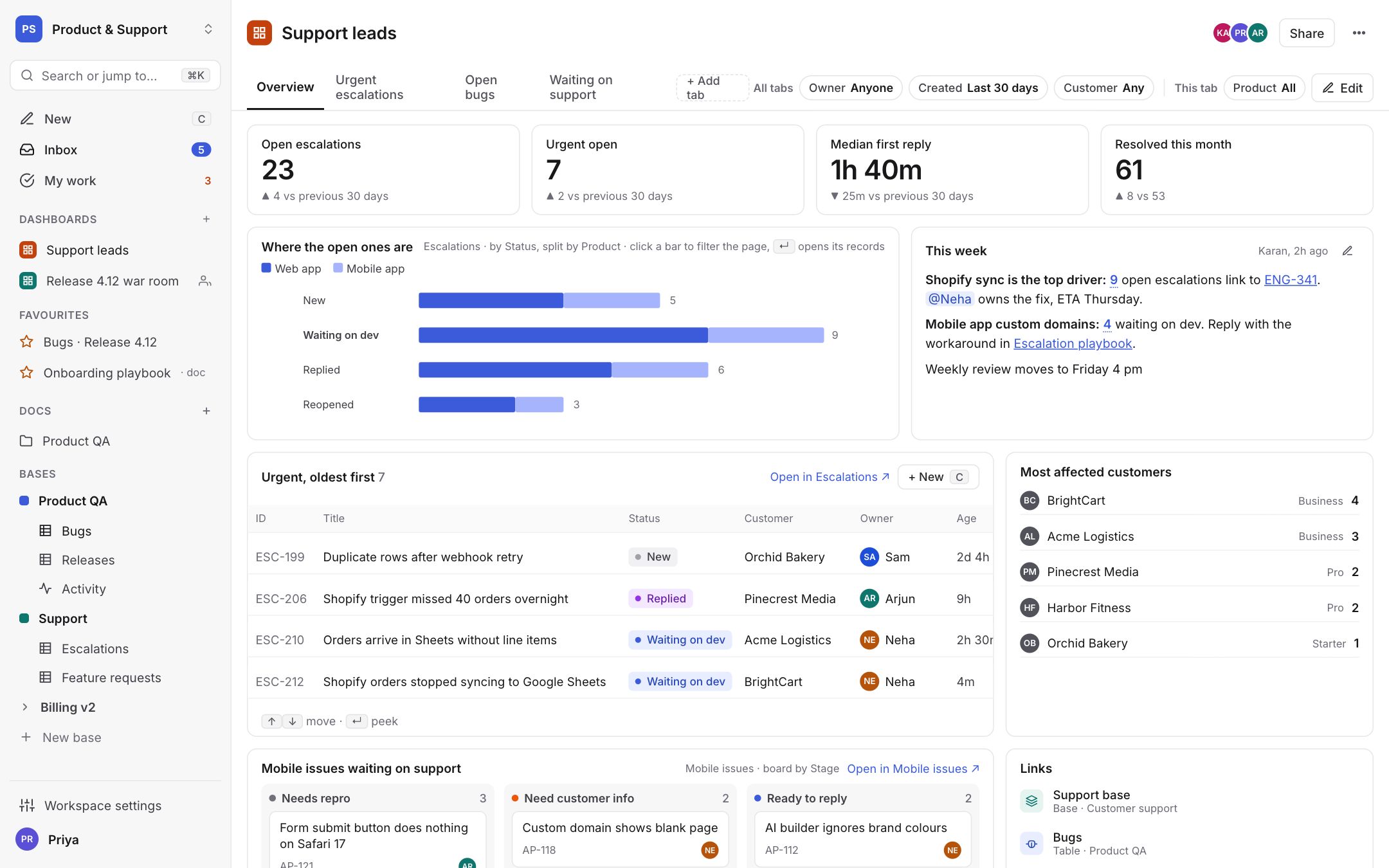
Click a number, click a bar
A number click lists its records in a panel beside the page: the filter written out, Break down by, Open in the table, Save as view. A bar click filters the whole page, shown as a blue chip with × to take it back. Blocks with no such field say "unchanged". A row opens the record as a peek over the page.
Open in the table shows the view with your click as temporary blue filters; the view is untouched. Back returns to the Dashboard as you left it.
Open in another Dashboard
Right-click a customer, an owner, a status, wherever it appears. Open in lists every Dashboard that takes that value; the target opens over the current page with the value applied and your other filters carried along. Drill again inside and a trail grows at the top; step back along it like browser history. A record page lists the Dashboards that explain it. How a Dashboard offers itself as a target
What you see is yours
A block shows only if you can open its source. Every number counts with your access, so it equals the count in the grid.